1. Home
  2. Features
  3. Follow-up tasks

Follow-up tasks

Every agreed callback becomes a task with a due date

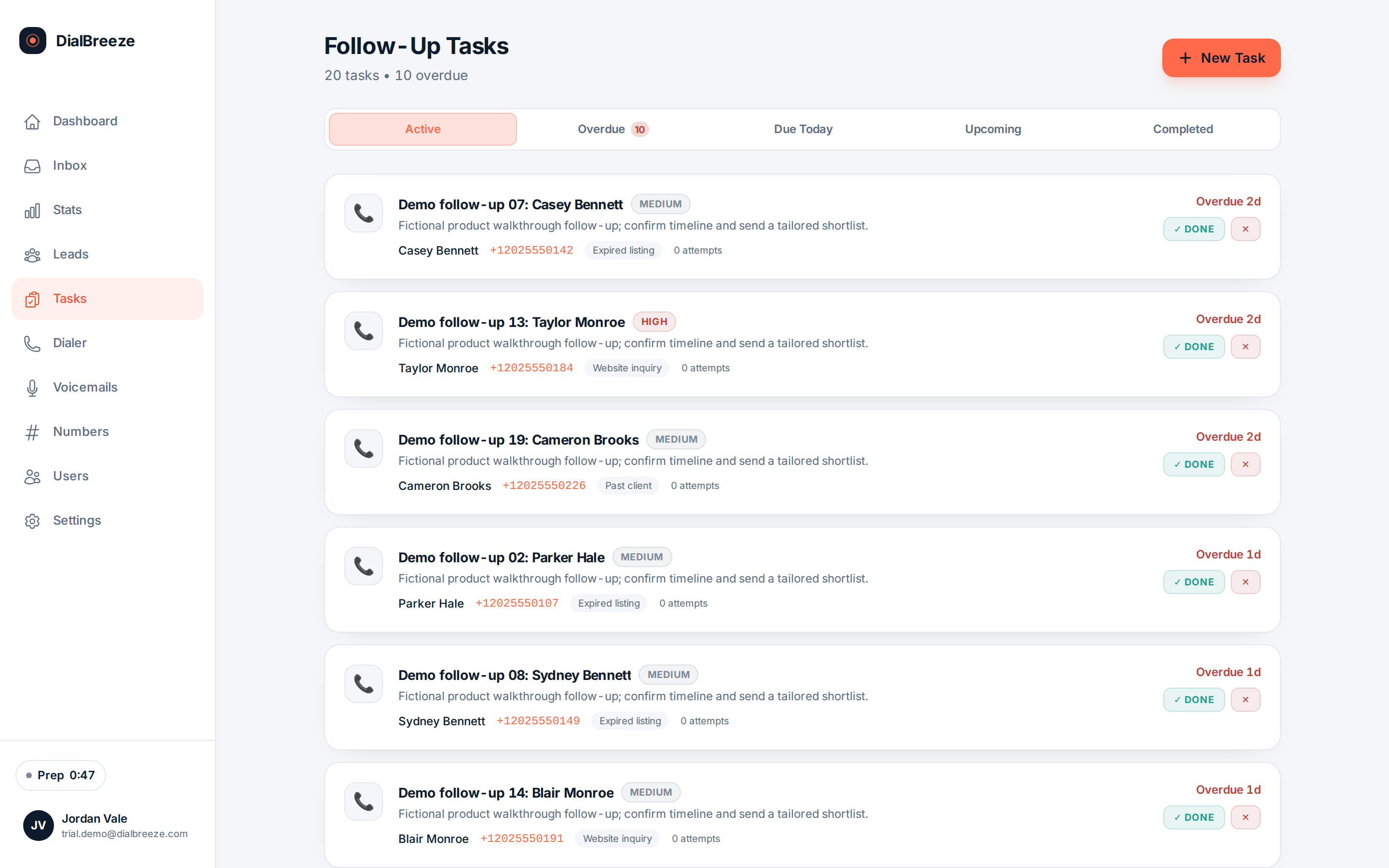
During wrap-up, you set the outcome and, in the same motion, create the follow-up: title, due date, priority, and the lead it belongs to. Quick presets cover tomorrow through two weeks. The task list and a due-today view keep the promises you made on the phone from evaporating after the session ends.

Real product interface. Sample data, fictional people and numbers.

How it works.

4 steps, in the order they happen during a session.

  1. 1

    Create it during wrap-up

    The disposition panel offers follow-up presets: tomorrow, three days, one week, two weeks, or a picked date. The task is created before you move to the next lead.

  2. 2

    Attach it to the lead

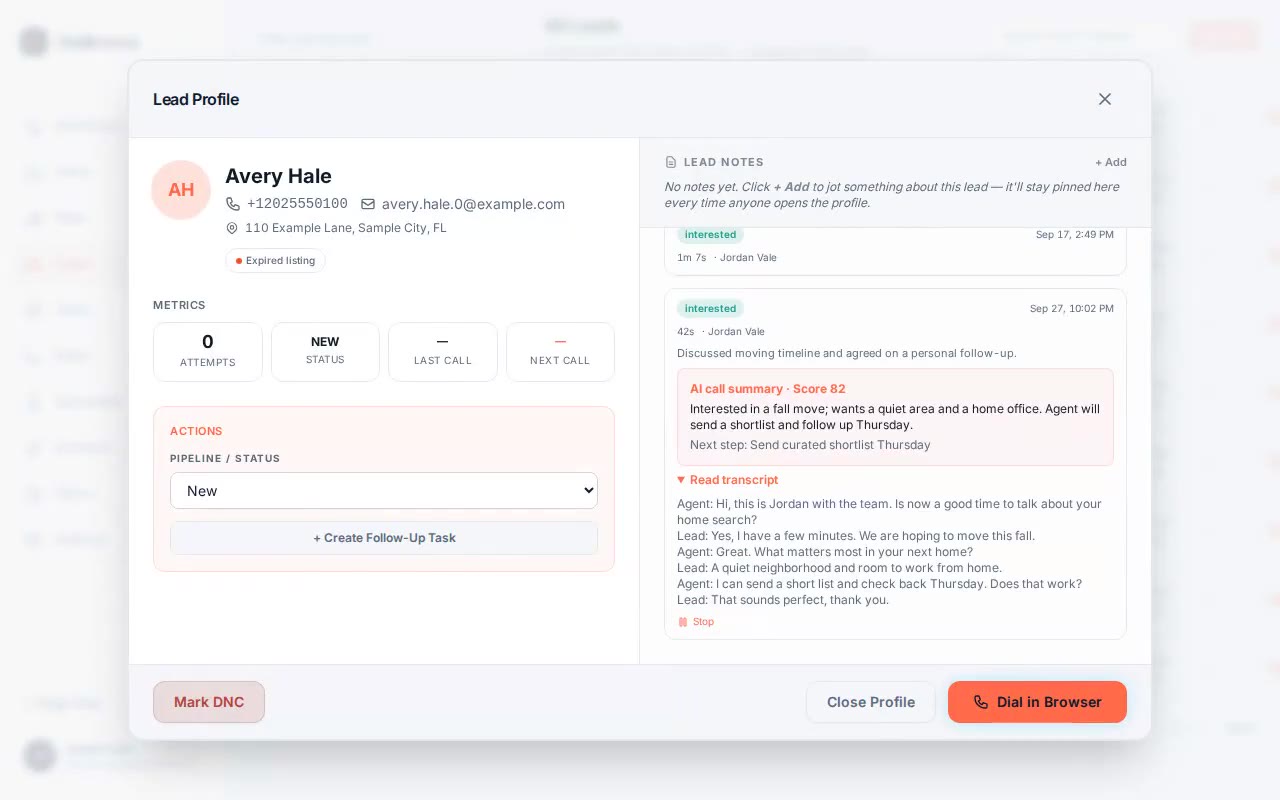
    A task links to its lead record, so whoever opens the lead later sees the commitment, the call history and the AI summary together in one place.

  3. 3

    Work the due-today queue

    A dedicated view lists due-today and overdue tasks, sorted by due date and priority. Warm files stay visible instead of aging quietly in a spreadsheet.

  4. 4

    Set the priority

    Tasks carry low, medium or high priority, and the list sorts accordingly. Type and description fields keep the details you will need when you call back.

The specifics.

What the product does today. Included on every plan, from Solo at $49 per seat.

Task list showing follow-ups with due dates, priorities and linked leads
Real product interface, sample data.
Task types
Call, text, email or other, so the task matches the promised action.
Priority levels
Low, medium and high; lists sort by due date, then priority.
Due-today view
Due-today and overdue tasks in one queue, per operator.
Linked to lead
Tasks attach to the lead record with the call history and summary.
Webhook handoff
Dispositions can flow to your CRM through a signed webhook for cross-system follow-up.

The promise you make on the phone

A callback agreed at 5PM is only worth something if it survives the next thirty dials. DialBreeze turns agreements into records while the call is fresh. The disposition panel carries follow-up presets, tomorrow, three days, one week, two weeks or a date you pick, and the task is created in the same wrap-up motion that saves the outcome.

Tasks carry a title, a description, a due date, a type of call, text, email or other, and a priority of low, medium or high. They link to the lead, which means the next reader gets the commitment beside the call history and the AI summary, not in a separate place that nobody opens.

This is deliberately simple. It is a task list with due dates and owners, in the tool where the calls happen, so the promise and the record never separate.
Working the queue, alone or as a team

The due-today view lists what is due and what is overdue, sorted by date and priority. An operator starting a day opens that queue first and works it down. A covering teammate sees the same commitments attached to the leads, with the summary explaining why the callback exists.

If your follow-up lives in another system, the signed webhook can carry call dispositions to your CRM so the commitment travels there too. The webhook is configured per deployment; ask in onboarding what your setup supports.

A saved task does not discharge your obligations. Permission to call back, calling windows and DNC handling still apply to every follow-up, and a task marked complete says the action happened, not that it was permitted.

Questions about follow-up tasks.

Straight answers. Anything else: email support.

Can I set a specific callback date?
Yes. Presets cover tomorrow, three days, one week and two weeks, and a date picker handles anything else, down to a same-day 5PM callback. The task carries a title, a description, a type of call, text, email or other, and a priority. It links to the lead, so the commitment shows up wherever that lead is reviewed.
How do tasks reach the rest of my team?
Inside DialBreeze, anyone who can see the lead sees its tasks, the call history and the AI summary. Outside, the signed webhook can push call dispositions to your CRM so follow-up work continues there. That outbound path uses an HMAC-SHA256 signature your receiver verifies, and it is configured per deployment rather than per seat.
What happens to overdue tasks?
They stay in the due-today view, which lists both due-today and overdue work sorted by date and priority, so aging items keep surfacing instead of sinking. An operator or a covering teammate works the queue from that screen. Marking a task complete records that the action happened; it does not record that the lead welcomed it.
Does AI create the tasks?
No. The operator creates the task during wrap-up, and the AI layer stays on its side of the record: transcript, score and summary after the call. The summary can surface a next step worth acting on, but a human decides and saves the commitment. That split is deliberate, so the record of a promise is always a human action.
Can I see tasks without opening each lead?
Yes. The task list is its own view, filterable by status and type, with due-date filtering and the due-today queue for what needs action now. Each task links back to its lead, so the context behind the commitment is one click away when you need it.

Try it on a real session.

Your 14-day trial runs on a Telnyx sandbox with test numbers; nothing reaches a real person. A human provisions the environment. The 14 days start when it is ready and we email you. No credit card is required. On conversion, you connect your own Telnyx account and real calling lists.

Start a 14-day trialPricing