- Home
- Alternatives
- JustCall alternative
Checked 2026-10-21
JustCall alternative from $29 a seat, and JustCall pricing.
JustCall Pro, the first plan with the power dialer, is $49 per user per month billed annually, with a 2-license minimum. Team is $29 and Pro Plus is $89 per user per month billed annually. Business is a custom quote. JustCall pricing, checked 2026-10-21.
JustCall is a cloud phone system with sales dialer. Below, JustCall's own published claims sit next to what DialBreeze measured in production use. Where JustCall did not publish a figure, we say so instead of guessing.
“Pro includes Power Dialer; SalesPro lists Predictive Dialer up to 10 lines.”
JustCall, justcall.io, checked 2026-09-29
JustCall pricing next to DialBreeze, checked 2026-10-21.
Published list prices from JustCall's own pricing page. "Not published" means the page shows no price, and we did not estimate one. Every JustCall plan has a 2-license minimum. Its monthly-billing prices were not captured on the date checked.
| Plan | Published price |
|---|---|
| JustCall Team | $29 per user per month, billed annually |
| JustCall Pro | $49 per user per month, billed annually |
| JustCall Pro Plus | $89 per user per month, billed annually |
| DialBreeze Breeze, 1 line | $29 per seat per month, month to month |
| DialBreeze Breeze, 1 line, continuous dialing and call notes | $29 per seat per month, month to month |
| DialBreeze Jetstream, Breeze with up to 3 lines | $49 per seat per month, month to month |
DialBreeze calling is separate: calling time at $0.75 per dialing hour on every plan, drawn from your calling credit. Phone numbers are $5 per month each. Your seat includes caller-ID phone numbers. Prices change; confirm on JustCall's site. We re-check these on the first Monday of each month.
JustCall vs DialBreeze.
Left column quotes or paraphrases JustCall's page and related first-party sources as fetched on the dates in our source data. Right column is DialBreeze today.
Vendor claims are advertised figures and often multipliers against manual dialing; our row is the team's own daily use on one line, how we counted it. Prices and features change; confirm on JustCall's site before you decide.
Choose JustCall if…
- You want a full business phone system with SMS and 100+ integrations.
- You want Pro's Power Dialer or SalesPro's Predictive Dialer (up to 10 lines) alongside your phone lines.
Choose DialBreeze if…
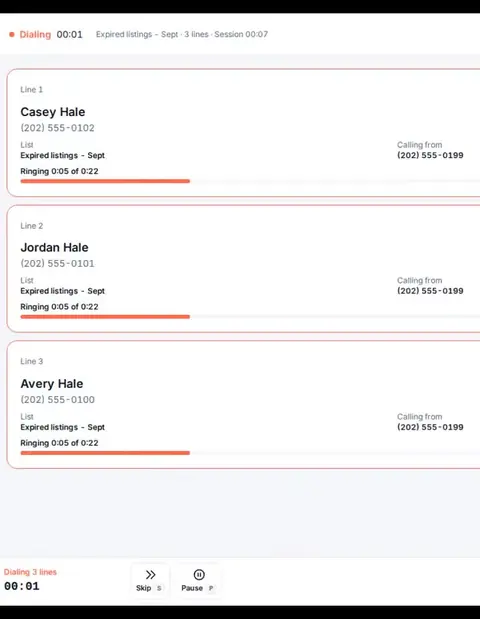
- With up to three lines ringing you talk to the first person who answers, on Jetstream ($49 per seat), with Breeze at $29 for one line.
- You want the calling line provided for you, with no carrier account to open or manage.
- You want a vendor that publishes its own measured dials per hour (typical and busy), not only multipliers.
Start with the question: dialer or phone system?
Some teams need a dialer for outbound work. Others need a business phone system with inbound routing, shared team numbers, texting and a call-flow builder. DialBreeze is a browser dialer for outbound calling. It is not a full business phone system with inbound routing and texting, and it does not send or receive texts. If your daily work depends on those features, choose a phone system.
A fair decision rubric
Score each line yes or no for your own operation, using the last month of real work. Do not score a feature you have not used.
- Do you need inbound calls to a business number routed to a person or queue?
- Is texting from business numbers a core workflow?
- Do you need two-way sync between your CRM and the phone tool?
- Do you need call recording for coaching? Recording must be turned on in your workspace, and your team handles consent.
- Do you need more than three lines per caller?
- Do you need outbound lists, outcomes, callbacks and tasks in one place?
- Do you need a one-way outcome feed to your own endpoint through a signed webhook?
- Do you want calling cost measured by the dialing hour? Model a typical week before you decide.
If most of your yes answers concern inbound routing, texting or two-way sync, a phone system fits better. If they concern outbound dialing, lists and follow-up, a dialer fits better. Count the no answers too. A tool that covers half your day will cost you in workarounds.
What DialBreeze does and does not do
- Browser dialing with a headset. One line on Breeze, and up to three lines on Jetstream.
- Lists from CSV import, a fixed set of ten outcomes, callbacks and tasks.
- Do-not-call checks and quiet hours by the lead's local time.
- A signed outcome webhook, where enabled on your plan, one way only. No native CRM connectors and no two-way sync.
Current seat prices and calling terms are on the pricing page. Check any vendor's claims on that vendor's own page on the day you decide, and write down the date you checked.
A two-week migration pilot
Do not switch everything at once. Run a pilot that answers your real question.
- Write the goal. Decide whether the pilot tests outbound speed on one list, or how cleanly outcomes reach your CRM.
- Pick one list and two users. Keep that list out of the other tool during the pilot.
- Import and compare. Check the number of leads in DialBreeze against the row count in your source file. Before the first dial, mark every old do-not-call number as do-not-call in DialBreeze, per lead or in bulk. Keep the old suppression records. Reconcile them before the first dial, and keep the list paused if you cannot confirm every suppressed number is marked do-not-call.
- Log daily in your own sheet. Record dials, connects, voicemails, outcomes and errors.
- Test the outcome path. If webhooks are enabled on your plan, confirm events reach your endpoint and that your CRM takes them correctly.
- Review on day 14. Compare setup time, errors, rep feedback and total cost for the hours used. Decide from your own numbers.
If the pilot shows a gap in inbound routing or texting, that is a useful result. Keep a phone system for those jobs and use the dialer for outbound work.
When to look at other categories
Look at a phone system if shared lines, inbound queues or texting are the core of your work. Compare Aircall, Trellus and Calilio on each vendor's own pages, and check the features you need against its current documentation.
Budget for the seat and the hours you dial
For one seat dialing 40 hours in a month, calling time is $30.00. That makes the monthly seat-plus-calling total $59.00 on Breeze, or $79.00 on Jetstream. This is an example, not a promise about call volume or results. Phone numbers are $5 per month each. See current plans and calling terms.
See the DialBreeze side for yourself.
The real dialer with sample data: three lines, one connects, the outcome goes on a hotkey.
Get started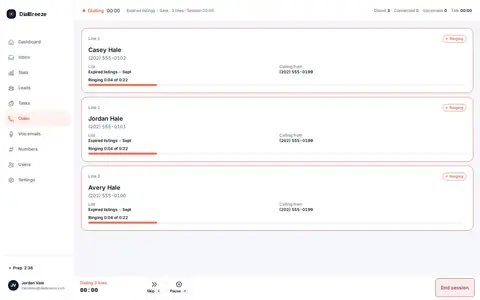
JustCall alternative FAQ.
Is DialBreeze a phone system?
How long should a pilot run?
Where can I check current prices?
What if my CRM needs data back from the phone tool?
Test it next to JustCall.
Pick a plan and try your outbound workflow with calling time.